


Using 'Testmoz' as an assessment tool
- Jacey JeongYeon Lee

- 2020년 6월 3일
- 7분 분량
최종 수정일: 2020년 6월 23일
Today I am going to review a website called 'Testmoz'. This is a free test making website which teachers can use to create quizzes or assessments. As our generation is modifying our lives to the usage of technology, I think it is very important for teachers to adapt their teaching styles based on technology. This post is a recommendation for teachers who would like to create an online quiz.
Link to the website: https://testmoz.com/
Before you use this website, I will give a brief tour on how to use this website. Please keep in mind that I have create the quiz on a free trial version.

This is the main page of the website and if you click on the "build a test" button, you can create a test for free.

And then, enter the name of the test and password. At this moment, the password is only for you so that only you and edit the test.

After you have created the title and password for the test, this page is the setting page where you can create the questions, answers, and other settings.


In this section of the setting page, you can write an introduction of the test, color theme, and language. Also, you can choose the layout of the quiz and then the result page as well.

And then, you can choose the time limit, amount of time you will allow your students to take the test and the password students will enter to take the test.
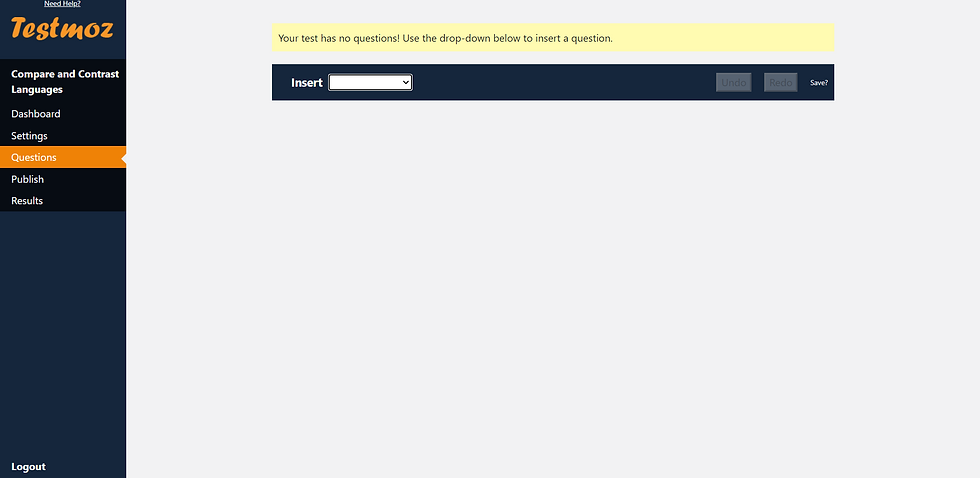

In question section, you can create questions for the quiz.
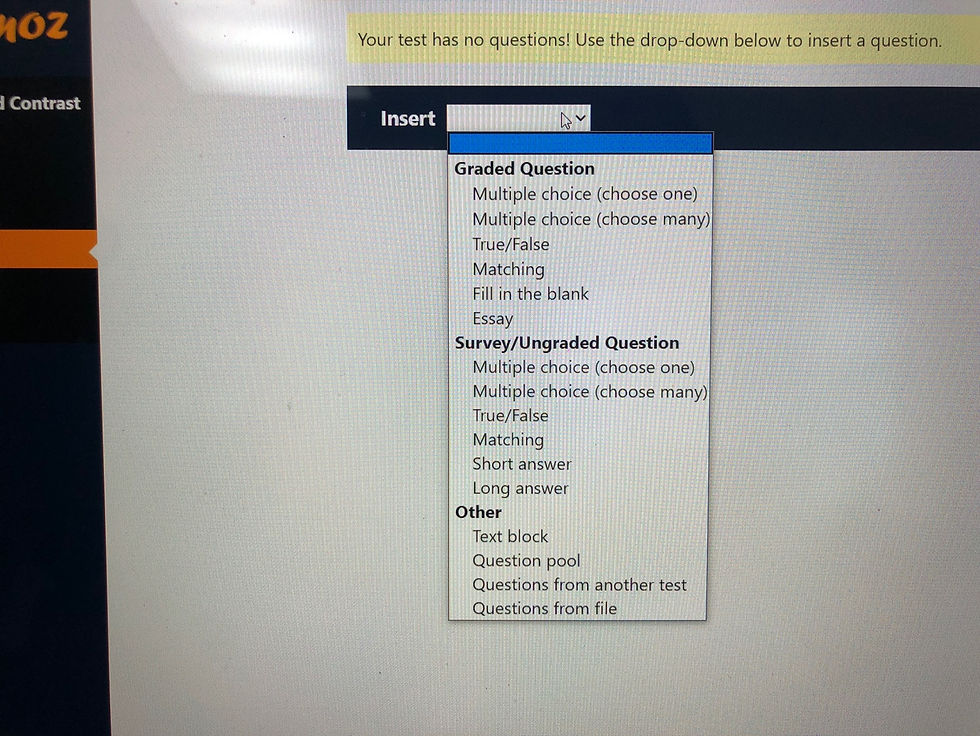
These are the various types of questions you can select and for free trial, you can only choose from "Graded question" category.

Once you are done, you can publish the test by send the link above.


This is how it will appear on student's screen and they can see the result right away. (You can also choose to reveal the result right away or not)
Advantages and disadvantages of this website:
In personal opinion, this website is a great quiz making tool even on a free trial version. It had diverse options for quiz types, various quiz layouts and themes. The most appealing system of this quiz was that you could select to randomize the order of the quiz. I think this could be very useful in a situation where students take the same test at a classroom together. It will prevent students from copying each other's answers. Also, I thought setting a time limit was another useful function because if you set the time short, students will not have the time to look up online because they have to manage their test taking time. This could possibly prevent cheating. Moreover, you could give feedback and explanations right away,
so it can help the students to have a better understanding of the lesson they are learning.
Despite it's great features, I could find some negativity to this website. First, you cannot add images on a free trial. This is very critical because it removes the visuals of the quiz. There could be so many questions which requires a visual explanation of the question, but it only works on a purchased account which was quite expensive ($50). Second, it does not contain any feature or function to monitor online test takers to see if they are using other web pages to search up the answers online. This is the most challenge every online test taking websites face, and Testmoz also failed to resolve such problem. Third, similar to what I have wrote for my google docs review, Testmoz also require you to put answers to all the questions. Thus, when you create a short answered, long answered and essay questions, if students do not answer exactly as your model answer, it would mark the answer wrong.
Reflection:
While I was searching different test making websites, I could find a lot of different website and application which made me realize how much our society is prepared for technology based teaching and learning. While I was making the quiz, I could experience both the positive and negative aspects on using technology to create quiz. It was convenient and quick, saved a lot of my time and energy to diversify the types of questions. Also, in the future, more and more students will be technology centered, so students will also feel comfortable taking tests online. However the downside of online test was that it cannot prevent students from copying and searching answers online. Unless there is a function on the website which forces students to share the screen while they are taking the test, the possibility of cheating while taking the test is higher because without it, cheating is not visible to teachers. Overall, I was very impressed by many features on test making website, but I still believe that there should be more modifications made to replace offline tests.
< Using 'Testmoz' as a lesson tool for TESL students >
Student profile:
Age: 21
Grade level: Sophomore of University (majoring in TESL)
Proficiency level: Novice high
Goals/objective of the course
In this lesson, students will be able to create a test about English (it could be anything) for imaginary students by using testmoz. The objective of the lesson is to teach students how to create an online quiz, and to help students develop test making skills. In the process of creating the quiz, students will be able to learn teacher's perspective of creating a lesson, and how to use teacher language.
Materials needed:
Desktop / Laptop
Analyzing 'Testmoz' under Hubbard's criteria of relationship between software and language acquisition
Hubbard's criteria:
1. Technical preview
- Have you got appropriate equipment? / Would the software run the way you want?
Yes. I would like this website to work on tablet, laptop, and desktop. As I have tested it out on three different devices, it worked perfectly on all the devices.
Also the website works fine both in chrome and internet explorer.
(internet explorer)

(Google Chrome)

2. Operation
- Is there a time limit on how long students have to give responses?
Students will be given one week to complete this task so that they can experience how teachers in reality have limited time to create class materials.
- Do students have freedom to move around the program?
The software provides diverse theme of the quiz, types of the quiz, format of the quiz, and style of the quiz, so students will have complete freedom to move around the program. However, if the students are going to use this program for free trial, they won't have as many access to the types of questions they can create from the list in the picture above.
- Does the student click, or speak, or type a word or more than a word?
Students must write more than a word because when creating a quiz, they need to explain well about the directions of the questions, and give concise information about the question so that test takers can understand the test fully.
- Does the program just say if something is correct, or does it provide explanations, prompts, and help?
In my opinion, Testmoz provides enough guidelines for users to understand their functions, however, it would have been better if there was a model question for users to look at when they create a test.
3. Teacher fit
- Try to infer the language teaching approach which the software reflects. Does it fit your own approach?
The languages the software contains does not quite fit my approach to teach students to use teacher language and perspective when creating a test. However, I want my students to think as if they were teacher when creating the test online, and this process will help students to learn and obtain teacher thinking process.
4. Learner fit
- Do the contents, skills, and language level of the software suit your students' needs, and those of the syllabus?
Yes, the contents, skills and language level of Testmoz suits what students' will need when they are going to create an online test. As testmoz provides diverse testing creating methods, this will definitely help them to practice building a test.
5. Implementation
- Could you integrate the software easily into the course or curriculum?
It depends on what I want them to learn, but in general this software cannot be easily put into class curriculum because this website is solely for creating tests. However if teachers want to access students' knowledge or language ability, they can perfectly use this tool to come up with an assessment.
6. Appropriateness
- If the software were a human teacher, would you want that person teaching your students?
Yes! Especially for how to use an online tool to create an online test. The directions on Testmoz is very helpful and if they could give tips on how to use their functions to make tests it would be a perfect leseson for TESL students to learn how to effectively use technology on creating online test.
Reflection:
I had real difficulty of choosing which criteria to use to analyze Testmoz because Testmoz is not a website of both language using and learning. However, I decided to use Hubbard's criteria because my lesson is more of content& skill learning while they learn a little bit of language, so Hubbard's criteria could reflect on the website better. According to Hubbard's criteria, I would give Testmoz a 8/10 for helpful software. The two minus points came from implementation and teacher fit category. For implementation, I saw the most limitation on Testmoz because its only function is test creating, so it cannot work flexibly at any circumstances. Also for teacher's fit, the website lacks language learning opportunities in the perspective of students. However, if this website works as a tool for assessing students' ability on language it would work. Considering that this website is an assessment tool, I believe that it is a perfect website because of it diverse funtions, but overall it is not a great language learning tool for students unless teachers have them take a test.


댓글